This post is for the Baofeng 1701 with OpenGD77 installed. without the cable and CPS software, OpenGD77 is quite limited to what can be changed manually. Some editing annoyances I’ve come across so far that can not be changed permanently without the USB cable are: no new zones can be added, saved channels can not be deleted, and options for changing the background and text colours can not be saved permanently. I’m sure there are more like this, but I haven’t encountered them yet. If / when I do come across something new I will update this post.
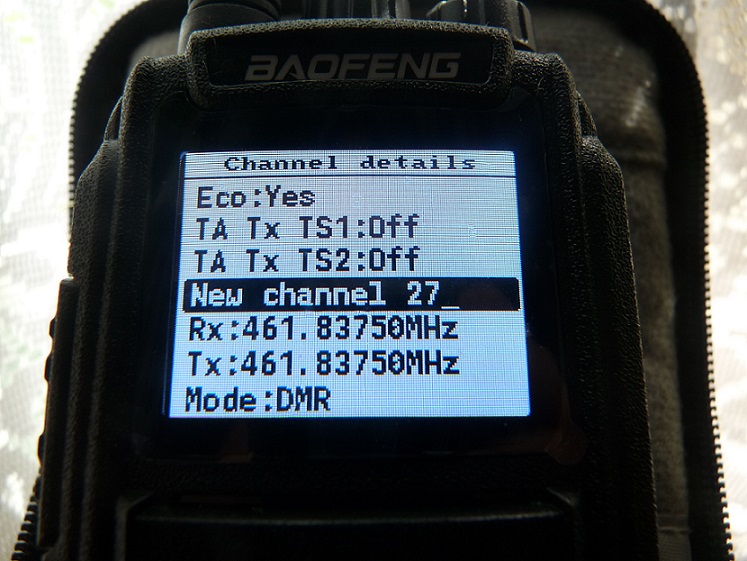
Well, at least the channels can be edited. So If you’ve saved a channel by mistake, or just want to delete it, without the cable and software it can’t be done. So you will have to edit the channel instead. In this example I am going to use changing the receive [RX] frequency of a channel to another frequency, as that is what I have had to do myself recently. See the step by step instructions below.
How To Edit The Frequency Of A Saved Channel Without The Cable
- Go to the channel you want to edit
- Press the Green Button
- Select “Channel Details”
- Go to the channels RX frequency [make sure it is selected / highlighted]
- Enter the new frequency on the keypad [just start pressing numbers]
- Once you have entered the new frequency press the Green Button
Now to save it permanently press and hold in the lowest button on the side of the radio [keep it pressed down], and at the same time press the Green button on the keypad. This will save the edited channel permanently. Once done turn the radio off, then back on to see if the changes have been saved. And that’s it, all done.
The same can be done for changing other options. Such as changing the saved channel from DMR to FM mode, TX frequency, channel name, colour codes etc.